 EV Charger Scout
You've signed the paperwork, driven it home, and plugged it in — and now you're standing in your garage wondering what you actually need to know. Most dealer handoffs are thirty minutes of features nobody asked for and zero minutes of practical charging advice. This guide fixes that. No fluff, no upsells — just the things that make real-world EV ownership smooth from day one.
Step One: Know What Connector You Have
Before anything else, identify your vehicle's charge port standard. This single piece of information shapes every public charging decision you'll make. Lift the charge port flap on the driver's side (or check the owner's manual) and match what you see to the reference chart below.
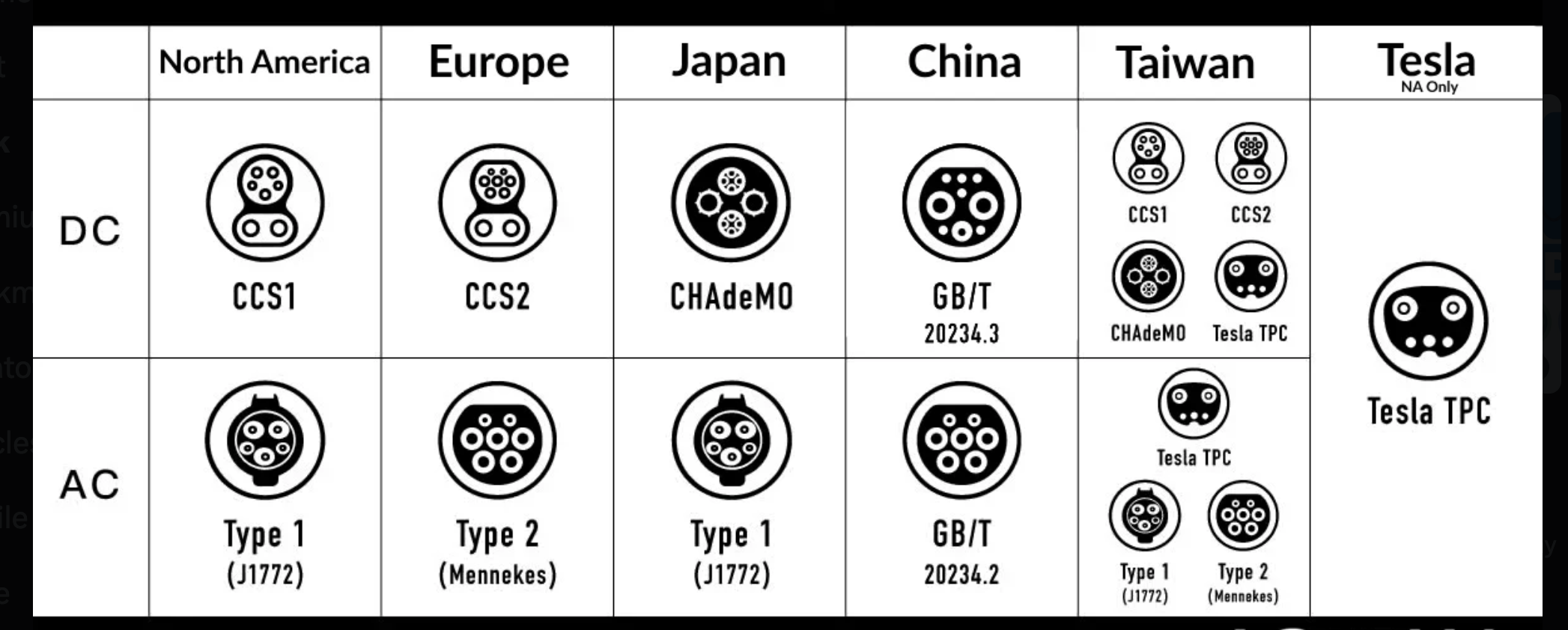
If you drive a newer North American EV, check whether it has NACS or CCS1 at the DC fast port. Many 2025 models from Hyundai, Kia, BMW, and Volkswagen switched to NACS for North America — check your port before buying any adapter.
Home Charging: The Most Important Setup You'll Do
Here's the honest truth about EV charging that nobody mentions at the dealership: roughly 80% of all charging sessions happen at home, overnight, while you're asleep. Public fast charging is for road trips and emergencies — it's not your daily routine. Getting home charging right is the foundation everything else builds on.
Level 1 — The Slow Option That Still Has Its Place
Every EV comes with a cable that plugs into a standard 120V household outlet (North America) or a 230V outlet (Europe/Australia). This is Level 1 charging — roughly 5–8 km (3–5 miles) of range per hour. For a battery electric vehicle with a 60+ kWh battery, that means 2–3 days to charge from empty. For a plug-in hybrid (PHEV) with a 15–25 kWh battery, Level 1 is genuinely usable. For a full BEV as your primary method — it's not.
Level 2 — The Right Answer for Most Owners
A Level 2 home charger connects to a 240V circuit (North America) or 400V three-phase (Europe) and delivers 25–80 km (15–50 miles) of range per hour depending on the charger's output and your car's onboard AC charging limit. A typical 60 kWh battery goes from 20% to 80% overnight in 4–6 hours. This is the setup most EV owners use every day.
- →Hire a licensed electrician. A Level 2 charger requires a dedicated 240V circuit, properly sized breaker, and appropriate wiring. In most countries, this must be done by a licensed electrician and may require a permit. Budget $200–$600 USD for installation depending on your panel distance and local rates (€150–€500 in Europe, AU$300–$800 in Australia).
- →Check your panel capacity. A 32A Level 2 charger draws 7.7 kW continuously. If your home panel is already near capacity, the electrician may recommend a load management circuit or panel upgrade. Ask before ordering hardware.
- →Universal vs. dedicated connector. If your household has or might ever have multiple EVs with different connectors (NACS and J1772/CCS), a dual-connector or universal charger saves you from buying two units. If you're a single-EV household, a dedicated charger for your connector is typically cheaper.
- →Smart charging features. Look for chargers with scheduling capability so charging starts automatically at off-peak hours (typically midnight to 6 a.m. in most markets). Many utility companies in the US, UK, Canada, and Australia offer EV-specific rate plans that can cut your charging cost in half during off-peak windows. Smart chargers unlock these savings automatically.

Emporia Universal Dual EV Charger
Best Value Universal — UL + ETL Certified, NACS & J1772 Dual Connector
* Amazon affiliate link — EV Charger Scout may earn a small commission at no extra cost to you.
Setting Up Your Charging Accounts
Public charging sessions are initiated through a mobile app, an RFID card, or — increasingly — by just plugging in (called Plug & Charge). Set up your network accounts before you need them, not in a parking lot at 12% battery.
| Network | Regions | How to Start a Session |
|---|---|---|
| Tesla Supercharger | North America, Europe, Australia, Japan, and more | Tesla app (for Tesla owners) or Tesla app guest account (for non-Tesla with NACS/adapter) |
| ChargePoint | North America, Europe (via Roaming) | ChargePoint app or RFID card |
| Electrify America / Electrify Canada | North America | Electrify America app, RFID card, or credit card tap |
| EVgo | North America | EVgo app, RFID card, or credit card tap |
| IONITY | Europe (36 countries) | IONITY app, credit card tap, or roaming via network partners |
| Pod Point | UK | Pod Point app or RFID |
| bp pulse (formerly Polar) | UK, Europe | App or RFID |
| EnBW / Plug'n'Charge | Germany, Europe | EnBW mobility+ app or RFID |
| Evie Networks | Australia | Evie app or credit card tap |
| Chargefox | Australia, NZ | Chargefox app or credit card |
| State Grid / BYD network | China | WeChat mini-program or network-specific app |
In North America, download the ChargePoint and Electrify America apps before your first road trip — those two networks combined cover most of the DC fast corridors outside Tesla. In Europe, IONITY and your automaker's own app (BMW Charging, Hyundai Bluelink, etc.) are the starting point.
Your First Public Charging Session
The first time at a public fast charger is mildly confusing for almost everyone. Here's what actually happens, step by step.
- 1Pull up to an open stall — check that the connector type matches your vehicle's port (or that you have the right adapter). At DC fast stations, look for a cable labeled with your connector standard.
- 2Open the charge port — on most vehicles this is done via the car's touchscreen, the vehicle's companion app, or by pressing the port door directly (it springs open on many models).
- 3Start the session — tap your RFID card, open the network app and tap Start, or simply plug in (on stations supporting Plug & Charge, it authenticates automatically). On stations with a credit card reader, tap your card and plug in.
- 4Confirm charging has started — the station display should show kW being delivered. Your car's display or app will show the charge rate and time estimate. If the session doesn't start within 60 seconds, unplug, wait 10 seconds, and try again.
- 5Don't leave immediately after plugging in — stay for 2 minutes to confirm the session is running. Walk away only once you see kilowatts flowing on the station screen.
- 6End the session before you unplug — on RFID or app-started sessions, end the session through the same method you started it (or the station will end it automatically when you unplug on most modern networks).
Charging etiquette matters: don't leave your vehicle occupying a DC fast charging stall for hours after it's finished charging. Most networks charge "idle fees" (typically $0.40–$1.00 per minute) after your battery reaches a certain level. Move your car when it's done — other drivers are waiting.
Do You Need an Adapter?
Adapters are the single most confusing topic for new EV owners and the one that saves the most frustration once understood. Whether you need one — and which one — depends entirely on your car and which charging networks you want to access.
| Your Vehicle Port | Charger You Want to Use | Adapter Needed? |
|---|---|---|
| NACS (Tesla) | Tesla Supercharger | No — plugs directly |
| NACS (Tesla) | CCS1 DC Fast Charger (EA, EVgo, ChargePoint) | Yes — CCS1-to-NACS adapter (~$70–$80) |
| NACS (Tesla) | J1772 Level 2 | Yes — J1772-to-NACS adapter (~$25–$45) |
| CCS1 (non-Tesla) | Tesla Supercharger (V3/V4 with NACS cable) | Yes — NACS-to-CCS1 adapter (~$50–$90) |
| CCS1 (non-Tesla) | Electrify America, EVgo, ChargePoint CCS1 | No — plugs directly |
| CCS2 (European EV) | IONITY, Fastned, Shell Recharge, EnBW | No — plugs directly |
| CCS2 (European EV) | Tesla Supercharger in Europe (Type 2 cable) | No — plugs directly (Tesla EU uses Type 2/CCS2) |
| GB/T (Chinese EV in China) | State Grid, BYD, NIO fast chargers | No — plugs directly |
If you drive a non-Tesla CCS1 vehicle in North America and want access to Tesla's Supercharger network — the largest and most reliable DC fast network in the US and Canada — a NACS-to-CCS1 adapter is the single best charging purchase you'll make. At $50–$90, it pays for itself in convenience on the first road trip.
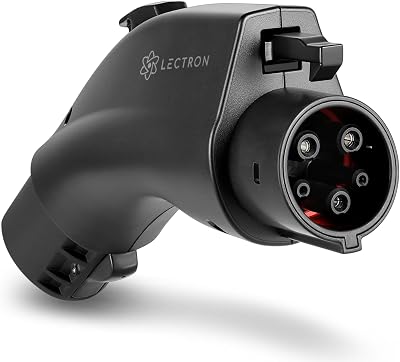
Lectron Vortex Plus NACS-to-CCS Adapter
The Gold Standard — UL 2252 Certified with Safety Interlock
* Amazon affiliate link — EV Charger Scout may earn a small commission at no extra cost to you.
Real-World Range: Setting Honest Expectations
Every new EV owner goes through the same experience: the rated range on the window sticker doesn't match what the car is actually delivering. That's normal, and understanding why it happens saves a lot of anxiety.
- →EPA / WLTP / CLTC ratings are testing-cycle numbers. In North America, EPA ratings are measured on a specific duty cycle at a controlled temperature. European WLTP figures tend to be closer to real-world but still optimistic. Chinese CLTC figures are the most optimistic of the three. Real-world range typically runs 10–20% below the rated figure in normal mixed driving.
- →Highway speed is the biggest factor. At 130 km/h (80 mph), most EVs consume 30–50% more energy per kilometer than at 90 km/h (55 mph). The faster you drive, the less range you get. This is physics, not a defect — aerodynamic drag scales with the square of speed.
- →Cold weather reduces range meaningfully. Below 0°C (32°F), expect 20–35% less range from most battery chemistries. Below −20°C (−4°F), real-world range may be 40–50% of the rated figure. Plan charging stops accordingly in winter.
- →HVAC load is real. Cabin heating in cold weather draws 2–5 kW continuously — a meaningful fraction of the total energy budget. Seat heaters are more efficient than blasting the cabin heater at full power; use them instead when conditions allow.
- →The dashboard estimate is a guess. Most range estimates are calculated from recent driving history. After a few minutes of highway driving, the estimate updates to reflect real consumption. Don't rely on it for precision — keep a comfortable buffer.
The 80% Rule and Battery Longevity Habits
Lithium-ion batteries live longest when they're not pushed to extremes at both ends of the state of charge. These habits are easy to form early and genuinely extend battery life over years of ownership.
- →Set your daily charge limit to 80%. All major EVs (Tesla, Hyundai, BMW, Kia, VW, etc.) allow you to set a maximum charge level. For daily driving, 80% is the sweet spot — it provides plenty of range for typical days and reduces stress on the battery chemistry. Most manufacturers explicitly recommend this in their owner's manual.
- →Charge to 100% only for road trips. Full charges are fine occasionally — the battery management system is designed to handle them — but doing it every night provides no practical benefit for short daily drives and incrementally increases long-term degradation.
- →LFP battery exception. If your vehicle uses an LFP (lithium iron phosphate) battery — most Tesla standard-range models, BYD vehicles, and many Chinese-market EVs — charge to 100% regularly. LFP chemistry benefits from regular full charges for accurate state-of-charge calibration. Tesla explicitly recommends 100% for LFP-equipped vehicles.
- →Avoid sitting at 0% for extended periods. Deep discharge isn't good for any lithium battery chemistry. If you're parking the car for a week or more, leave it at 50–60%.
- →Use scheduled charging. Most EVs allow you to set a departure time or a charging schedule. The car will charge to your set limit, finishing just before you leave — which means you're not sitting at 100% for eight hours every night (which is mildly worse for the battery than reaching 100% right before driving).
Planning Your First Road Trip
EV road trips require about 10 minutes of extra planning compared to a petrol trip — not hours. The basic approach is simple: identify fast-charging stops every 150–250 km (90–150 miles) along your route, targeting stations with 150 kW+ chargers for fastest stops, and plan to arrive at each charger with 10–20% remaining (not 2%). Apps like ABRP (A Better Routeplanner), your car's built-in navigation, and EV Charger Scout can show you station locations filtered by connector type along your specific route.
- →20-minute fast stops beat long waits. Charging from 10% to 70–80% at a high-power station typically takes 20–35 minutes. That's a coffee break. Charging from 70% to 100% takes just as long or longer due to the BMS tapering charge speed. Stop earlier, charge faster.
- →Have a backup station ready. Charger faults happen — typically at a 2–5% rate industry-wide. Before you commit to a critical charging stop, identify the next nearest station as a backup.
- →Check live availability before detouring. Tools like EV Charger Scout show real-time port availability via TomTom data at many stations. Check before you leave the highway, not when you're already parked.
- →Navigate to the charger (don't just drive there). On Tesla, Hyundai Ioniq, BMW, Kia, and most current EVs, setting a DC fast charger as your navigation destination triggers automatic battery preconditioning — warming the battery to its optimal charging temperature during transit. Arriving with a pre-conditioned battery can reduce a 90-minute cold-battery charging stop to the expected 25 minutes.
International Context: Charging Outside North America
Europe and the United Kingdom
European EVs use CCS2 for DC fast charging and Type 2 for AC Level 2 — both connectors are standard across the continent and UK. Charging infrastructure in Western Europe (Germany, Netherlands, France, Norway, Switzerland) is dense and reliable. IONITY provides 350 kW high-power charging on major highways. The EU's AFIR regulation now mandates fast chargers at highway service areas every 60 km on the core TEN-T network, which means charging availability on major corridors is improving rapidly. In the UK, pod Point, bp pulse, and Osprey serve highways and retail locations. Contactless payment (credit/debit card tap) is common at European chargers — an RFID card or app is backup, not primary, for many networks.
Australia and New Zealand
Australia uses CCS2 for DC fast and Type 2 for AC — the same as Europe. The NRMA, Chargefox, Evie Networks, and Tesla Supercharger networks provide highway coverage on the east coast. Coverage in regional Western Australia and the Northern Territory is sparse — route planning with larger buffer is essential. New Zealand similarly uses CCS2, with ChargeNet NZ and Mercury Energy providing the primary public network.
China
China uses GB/T connectors for both AC and DC charging — incompatible with all other global standards. If you're relocating to China with an EV, you need a China-spec vehicle. The charging infrastructure is extraordinarily dense — China has more public chargers than any other country — with State Grid, BYD, NIO, and third-party operators running millions of charging points. Payment is almost universally via WeChat Pay or Alipay through in-app QR codes.
Japan
Japan is a CHAdeMO holdout — a large portion of the legacy fast charging network uses CHAdeMO, which is incompatible with CCS. Newer Japanese infrastructure is adding CCS2 alongside CHAdeMO as the standard transitions. Nissan and Mitsubishi domestic vehicles still ship with CHAdeMO ports in Japan. Imported Tesla, BMW, Hyundai, and other CCS2-port vehicles can use CCS2 chargers, which are increasingly available at dealer networks and highway rest areas.
Your First Month Checklist
| Task | When to Do It | Done? |
|---|---|---|
| Identify your connector type (NACS, CCS1, CCS2, GB/T) | Day 1 | ☐ |
| Download your car's companion app and set up remote control | Day 1 | ☐ |
| Set daily charge limit to 80% (or 100% if LFP battery) | Day 1 | ☐ |
| Plug into Level 1 to keep the battery from sitting low | Day 1–2 | ☐ |
| Schedule Level 2 home charger installation with an electrician | Week 1 | ☐ |
| Download ChargePoint, Electrify America/Canada apps (North America) | Week 1 | ☐ |
| Download IONITY, bp pulse, or your regional network app (Europe/AU) | Week 1 | ☐ |
| Set up scheduled charging for off-peak hours (check your utility rate plan) | Week 1 | ☐ |
| Make your first public Level 2 charging stop to practice | Week 1–2 | ☐ |
| Determine if you need a DC fast charging adapter for your connector/networks | Week 2 | ☐ |
| Download ABRP or enable navigation in your EV app for road trip planning | Week 2 | ☐ |
| Make your first DC fast charging stop (plan it, don't just stumble in) | Week 2–3 | ☐ |
| Enable software update notifications so you get charging improvements OTA | Ongoing | ☐ |
| Check tire pressure monthly — cold air drops PSI and hurts range | Monthly | ☐ |
EV Charger Scout pulls station data from NREL and OpenChargeMap — giving you searchable public charging coverage across North America and globally via OCM. Filter by connector type, minimum power, and network, and tap any station for weather, nearby amenities, and live port availability data. Use it for daily lookups and road trip research alike.
Frequently Asked Questions
What's the first thing a new EV owner should do?
Identify your car's connector (NACS, J1772, CCS, or Type 2 depending on region) and set up home charging. Home charging is the single biggest convenience upgrade and where you'll do most of your charging — sort it first.
Should I charge to 100% every night?
No. For daily driving, charge to about 80% to extend battery longevity, and only charge to 100% before a long trip. Most EVs let you set a charge limit so this happens automatically.
Do I need a special adapter as a new EV owner?
Possibly. In North America, J1772/CCS1 and NACS cars often benefit from an adapter to reach the widest network of stalls, including Tesla Superchargers. Check what your car ships with and what the stations you use most require.
How do I handle my first public charging session?
Download the relevant network app(s) ahead of time, set up payment, and arrive with the station selected. Plug in, start the session via the app or tap-to-pay, and expect DC fast charging to slow as you approach 80%. Giving yourself a buffer for the first few sessions reduces stress.
What real-world range should I expect?
Plan for somewhat less than the rated figure — cold weather, highway speeds, and climate control all reduce range. A practical habit is to treat about 80% of the rated range as your comfortable real-world planning number, then adjust as you learn your car.
More guides on Charging 101
Explore the full Charging 101 topic hub — related guides that build on this one.
EV Charging Station Types Explained: Level 1, Level 2, and DC Fast Charging
8 min read
EV Battery Life in 2026: How Long It Really Lasts and 7 Proven Ways to Slow Degradation
14 min read
Tesla Charging in North America: The Owner's Guide to NACS, Adapters, and What's New in 2026
13 min read
2026 EV Connector Guide: Which Cars Use NACS, CCS, J1772, and More
10 min read
NACS vs. CCS Adapters: A Global Guide for EV Drivers
10 min read