 EV Charger Scout
Tesla's Supercharger network has over 65,000 individual charging ports globally as of early 2026, and most of them are now accessible to non-Tesla EVs. For Rivian and Ford owners specifically, this is a significant deal — the Supercharger network covers highway corridors, suburban retail centers, and urban garages in a way that no other single network does. But the details of whether you need an adapter — and which one — depend on two things: your vehicle's market (North America vs. Europe) and your model year.
This guide covers both. Let's go through it exactly.
The Single Most Important Thing: Connectors Differ by Market
Before anything else, it's worth understanding that Ford and Rivian vehicles sold in different regions have different charging connectors — and Tesla's own Supercharger cables also differ by region. This changes everything about whether you need an adapter and what type.
| Market | Tesla Supercharger Cable | Ford Mach-E / Lightning Connector | Rivian Connector | Adapter Needed? |
|---|---|---|---|---|
| USA / Canada | NACS | CCS1 (pre-2025) or NACS (2025+) | CCS1 (pre-mid-2024) or NACS | Only if CCS1 vehicle |
| Europe / UK | CCS2 | CCS2 (all years) | Not yet available | No — CCS2 plugs straight in |
| Australia | CCS2 (most sites) | CCS2 | Not yet available | No — CCS2 plugs straight in |
European and Australian Ford Mustang Mach-E owners can plug directly into a Tesla Supercharger with no adapter at all — the Supercharger stall's cable is CCS2, and so is the Mach-E. The adapter conversation is primarily a North American one. That said, read on for the full breakdown in each market.
North America: Do You Even Need an Adapter?
Before anything else, check your vehicle's charging port. A CCS1 port has a large rectangular opening with a smaller round section above it and two thick flat rectangular DC pins at the bottom — you can feel them. An NACS port is a compact oval slot about the width of a thumb, smooth and clean-looking.
If you have NACS already, you plug directly into a US or Canadian Supercharger the same as any Tesla. No adapter, no extra setup beyond a Tesla account. If you have CCS1, you need an adapter. Keep reading.
Rivian in North America: Your Exact Connector by Build Date
Rivian's connector transition is one of the cleanest stories in this space because they handled existing owners unusually well.
R1T and R1S — Pre-2024 Builds
If your R1T or R1S was built before approximately mid-2024, it came off the factory floor with a CCS1 port. Rivian was one of the first non-Tesla manufacturers to formally commit to NACS (announced in June 2023, shortly after Ford), and they took the additional step of mailing a complimentary NACS Charging Adapter to every owner of a CCS1 R1 vehicle.
The Rivian NACS Charging Adapter has a CCS1 female receptacle on one end (which plugs into your R1's port) and a NACS male plug on the other (which inserts into the Supercharger's NACS cable socket). It's rated for the full DC fast charging rate the Supercharger can provide, up to the R1's own max acceptance rate.
If you bought your CCS1 R1 used and the adapter didn't come with it, check the Rivian owner portal — there may still be a pathway to claim one, or you can purchase a compatible adapter from Tesla's website.
R1T and R1S — Gen 2 (mid-2024+)
Rivian's Gen 2 R1T and R1S refresh (launched June 2024) kept the CCS1 port. Rivian delayed its native-NACS transition on the R1 line, so even 2024 and 2025 Gen 2 R1 vehicles ship with CCS1 and rely on the free Rivian NACS adapter for Supercharger access. The cleanest way to confirm is to look at your port directly or check your vehicle's build sheet in the Rivian app under "Vehicle Details."
R2
Rivian's R2 (deliveries starting 2026) is the first Rivian designed around a native NACS port from the factory. If you have an R2, plug directly into the Supercharger cable.
Rivian International
As of early 2026, Rivian sells primarily in North America. International expansion is underway but limited. If Rivian vehicles become available in Europe or Australia in the future, expect them to ship with CCS2 ports to match local infrastructure — which would mean no adapter needed for Superchargers in those regions.
Open the Rivian app → tap your vehicle → go to Charging. The app displays your vehicle's native connector type and shows a list of compatible charging networks. If Tesla Supercharger appears without an asterisk, you have NACS.
DC Fast Charging Upgrade · EV Shop
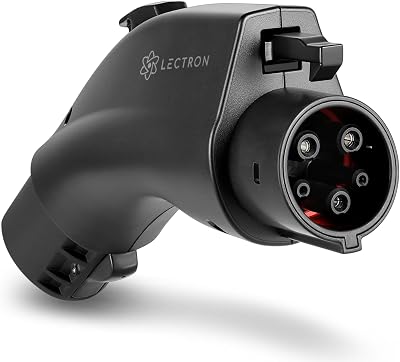
Lectron Vortex Plus NACS-to-CCS Adapter
The Gold Standard — UL 2252 Certified with Safety Interlock
* Amazon affiliate link — EV Charger Scout may earn a small commission at no extra cost to you.
Ford: Connector by Model, Year, and Market
Ford announced NACS adoption in May 2023, making them the first non-Tesla major automaker to commit to the standard. But the connector on your specific vehicle depends heavily on when it was built and where it was sold.
F-150 Lightning — North America Only
The F-150 Lightning is sold exclusively in North America and is not available in European or other international markets. So there's only one connector story here:
| Model Year | Connector (NA) | Notes |
|---|---|---|
| 2022 | CCS1 | All units. Adapter needed for US/CA Superchargers. |
| 2023 | CCS1 | All units. Adapter needed for US/CA Superchargers. |
| 2024 | CCS1 or NACS | Mixed production run. Check your build — some 2024s have NACS. |
| 2025+ | NACS | All units. Plugs directly into US/CA Superchargers. |
For 2022–2023 Lightning owners, Ford provided a NACS adapter through their Ford Power Promise program. If you didn't receive yours, check your Ford account on ford.com or contact Ford Customer Service — the program ran through 2024 and adapters may still be available.
Mustang Mach-E — North America
| Model Year | Connector (NA) | Notes |
|---|---|---|
| 2021–2023 | CCS1 | Adapter needed for US/CA Superchargers. |
| 2024 | CCS1 or NACS | Mixed production — confirm via SYNC system or Ford app. |
| 2025+ | NACS | Native. No adapter needed at US/CA Superchargers. |
If you have a 2024 model year Ford that shipped with CCS1, you can confirm your connector type by VIN on the National Highway Traffic Safety Administration (NHTSA) vehicle lookup tool (US), which lists equipment specs including charging system type.
Mustang Mach-E — Europe and UK
The European and UK Mach-E has always shipped with a Type 2 AC connector and CCS2 DC fast charging port — the standard across all European EVs. This means:
- →European and UK Mach-E owners do not need any adapter to use Tesla Superchargers in Europe. The Supercharger's CCS2 cable plugs straight into your car.
- →All major European DC fast charging networks (IONITY, Fastned, Allego, Osprey, bp pulse, Pod Point, EnBW, etc.) use CCS2 natively. No adapters needed anywhere.
- →The connector transition happening in North America (CCS1 → NACS) does not affect European or UK drivers at all.
You already have the right connector for every major fast charger in Europe, including Superchargers. The only setup you need is a Tesla account. No adapter, no compatibility research — just sign up and plug in.
Mustang Mach-E — Australia
Australian-market Mach-E vehicles ship with CCS2, matching Australia's mandated public DC fast charging standard. Like European owners, Australian Mach-E drivers can plug directly into CCS2 Supercharger stalls without any adapter. Australian public charging networks (Chargefox, Evie Networks, NRMA Energy, ChargePoint AU) all use CCS2 for DC fast charging.
If You Have CCS1 (North America): Your Adapter Options in 2026
Option 1: Manufacturer-Issued Adapters
- →Rivian NACS Adapter — provided free to pre-NACS R1 owners. Still available through Rivian's shop if you need a replacement. Rated to 500A / 1,000V DC — handles V3 Supercharger speeds without thermal throttling.
- →Ford NACS Adapter — part of the Ford Power Promise program. Check ford.com/power-promise or contact Ford directly. Works with both F-150 Lightning and Mustang Mach-E CCS1 vehicles.
Option 2: Tesla's NACS Adapter
Tesla sells a universal NACS adapter through their website and in Tesla stores, designed for non-Tesla CCS1 vehicles. At around $50–$60, it's a solid choice if your manufacturer's adapter isn't available. It works on V2, V3, and V4 Superchargers and communicates vehicle identity to the station for accurate billing.
Option 3: Third-Party Adapters
Third-party CCS1-to-NACS adapters range from $30 to $120. Quality matters significantly at DC fast charging currents — V3 Superchargers deliver up to 250kW, V4 units up to 325kW. A substandard adapter can fail mid-session or, in rare cases, cause damage.
- →Buy from brands that publish independent safety testing documentation
- →Verify the adapter is rated for at least the amperage your vehicle accepts at DC fast charge
- →Check vehicle compatibility lists explicitly — not just 'CCS1 compatible' in general
- →Avoid adapters sold without a brand name or return policy
Setting Up Your Tesla Account — Works Everywhere
Regardless of your market, you need a Tesla account to use a Supercharger as a non-Tesla driver. The process is identical worldwide:
- 1Go to tesla.com and create a free account, or use the Tesla app.
- 2Add a payment method. Tesla accepts major credit cards globally; some regions support additional local options.
- 3In the app, go to Charging → Add Non-Tesla. This enables non-Tesla access on your account.
- 4Optionally add your vehicle's make and model for real-time charging curve data in the app.
Newer V3 and V4 Supercharger stalls (in both North America and Europe) have touchscreens and accept credit cards directly — no app required for payment. But the app gives you session monitoring, charge-complete notifications, and idle fee alerts, which are worth having regardless of where you charge.
Tesla charges idle fees after your vehicle has finished charging and you haven't moved it. This applies to non-Tesla drivers in every market where the network is open. The fee kicks in when the station is more than 50% occupied and your charge is complete. Set an alert in the Tesla app.
Home Charging Upgrade · EV Shop

Autel MaxiCharger AC Wallbox
Best Heavy-Duty — 40–50A, OCPP, RFID, Screen, Workplace-Grade
* Amazon affiliate link — EV Charger Scout may earn a small commission at no extra cost to you.
What to Expect in the Stall
The physical process is slightly different depending on your market:
North America (with a CCS1 vehicle and adapter)
- 1Pull up to a stall. V3 stalls have a slim silver column; V4 stalls are taller; V2 stalls are older with thicker columns.
- 2If it's a Magic Dock station, the CCS1 adapter is built in. Start the session in the Tesla app first — it unlocks the adapter so you can detach and connect it to your car.
- 3If it's a standard stall, attach your adapter (Rivian, Ford, or Tesla adapter) to your vehicle's CCS1 port first, then insert the Supercharger cable's NACS end into the adapter.
- 4Start the session via the Tesla app or the stall's payment screen.
- 5Watch for the charging confirmation — it should appear on your vehicle's cluster or app within about 30 seconds.
Europe, UK, Australia (CCS2 vehicle — no adapter)
- 1Pull up to any Supercharger stall — all of them have CCS2 cables in these regions.
- 2Open the Tesla app and start a session for your non-Tesla vehicle, or use the stall's touchscreen.
- 3Plug the CCS2 cable directly into your car's CCS2 port.
- 4Charging begins automatically once the app confirms the session.
If the charger doesn't initiate within 60 seconds, try unlocking your vehicle (sometimes the car needs to be unlocked for the handshake to complete), then re-initiate the session in the app.
Speed and Pricing Reality
Charging Speed
Your vehicle's max DC fast charge rate is the ceiling regardless of what the Supercharger can deliver. Key reference points:
| Vehicle | Max DC Rate | Bottleneck at V3 Supercharger (250kW) |
|---|---|---|
| Rivian R1T / R1S (Enduro/Max Pack) | 220 kW | Vehicle — Supercharger has headroom |
| Ford F-150 Lightning (Std Range / Extended Range) | ~115 kW / ~150 kW | Vehicle |
| Ford Mustang Mach-E (2023+ Extended Range) | ~150 kW | Vehicle |
| Ford Mustang Mach-E (EU CCS2) | ~150 kW | Vehicle |
Real-world speeds are always lower than rated max. The 20–80% state-of-charge window gives you the fastest charging rates. Above 80%, all modern EVs taper the charge rate to protect the battery — this is true at Superchargers, IONITY, Electrify America, or any other DCFC network.
Pricing
Non-Tesla drivers pay per kWh at Superchargers, at a rate typically somewhat higher than what Tesla owners pay. Pricing varies significantly by country — California Superchargers are more expensive than Midwest US; UK and Scandinavian pricing reflects local electricity costs. Always check the Tesla app or the stall screen before confirming a session — the rate is displayed clearly before you commit.
Tesla's Monthly Membership plan for lower per-kWh rates is available to Tesla vehicle owners only. Non-Tesla drivers pay the standard retail rate, which is still competitive with Electrify America (US) and comparable to IONITY retail pricing (EU) in most markets.
Bottom Line by Market
| You have... | Market | Action |
|---|---|---|
| Rivian R2, or R1 with NACS | USA / Canada | Plug straight into any Supercharger. Just need a Tesla account. |
| Rivian R1 with CCS1 (pre-mid-2024) | USA / Canada | Use the Rivian NACS adapter. Check the owner portal if you don't have one. |
| Ford Mach-E or Lightning 2025+ | USA / Canada | NACS — plug straight in. Tesla account required. |
| Ford Mach-E or Lightning pre-2025 | USA / Canada | CCS1 — use Ford NACS adapter or Tesla's adapter (~$50). |
| Ford Mustang Mach-E (any year) | Europe / UK | CCS2 — plug straight into EU Supercharger. No adapter. |
| Ford Mustang Mach-E (any year) | Australia | CCS2 — plug straight in. No adapter. |
The Supercharger network is a legitimate upgrade to the charging landscape for any vehicle that can access it. The coverage, reliability, and uptime numbers are meaningfully better than the non-Tesla DCFC alternatives in most regions. Whether you need an adapter or not, it's worth adding Superchargers to your charging options.
EV Charger Scout pulls live Supercharger data globally from both NREL and OpenChargeMap. Filter by connector type, check the Ports tab for per-stall kW data, and verify non-Tesla access notes in the station detail panel before committing to a stop — in any country.
Frequently Asked Questions
Do Rivian and Ford EVs need an adapter to use a Tesla Supercharger?
It depends on your connector and market. In the US and Canada, NACS-equipped vehicles (Ford 2025+, Rivian R2, and R1s built with NACS) plug straight in, while CCS1 vehicles need a CCS1-to-NACS adapter. In Europe and Australia, Ford Mach-E vehicles ship with CCS2 and plug directly into the CCS2 Supercharger cable with no adapter at all.
How do I know if my Rivian has CCS1 or NACS?
Check your charge port or the Rivian app. R1T and R1S built before roughly mid-2024 — including Gen 2 builds launched in June 2024 — ship with CCS1, while the R2 (deliveries from 2026) is Rivian's first native-NACS vehicle. In the Rivian app, go to your vehicle then Charging; if Tesla Supercharger appears without an asterisk, you have NACS.
Did Rivian and Ford give owners free Supercharger adapters?
Yes. Rivian mailed a complimentary NACS Charging Adapter to every owner of a CCS1 R1 vehicle, and it's still available through Rivian's shop if you need a replacement. Ford provided a NACS adapter for 2022–2023 Lightning and earlier Mach-E owners through its Ford Power Promise program — check your Ford account if you didn't receive one.
What adapter options do CCS1 owners in North America have?
There are three routes: the manufacturer-issued Rivian or Ford NACS adapter, Tesla's universal NACS adapter sold for around $50–$60 that works on V2, V3, and V4 Superchargers, or a third-party CCS1-to-NACS adapter ranging from about $30 to $120. With third-party units, buy from brands that publish independent safety testing and verify the adapter is rated for your vehicle's DC charge amperage.
Do I need a Tesla account to charge as a non-Tesla driver?
Yes. In every market you create a free Tesla account, add a payment method, and select Charging then Add Non-Tesla in the app to enable access. Newer V3 and V4 stalls also accept credit cards directly without the app, but the app still provides session monitoring, charge-complete notifications, and idle-fee alerts that are worth having.
More guides on Network Access
Explore the full Network Access topic hub — related guides that build on this one.
Non-Tesla EVs at Superchargers: Which Brands Have Access Now (March 2026)
10 min read
UK Ultra-Rapid Charging: The Best 350 kW+ Stations and Motorway Routes to Map Now
14 min read
BMW 2026 i3 & iX3: Native NACS Ports Explained – Which Public Chargers Work Best
11 min read
Stellantis EVs (Jeep, Dodge, Ram) Now on Tesla Superchargers: How to Find Compatible Stations Today
11 min read