 EV Charger Scout
Here's something most EV owners find out too late: the public charging network available to your car is larger than you think — sometimes by hundreds of stations — and a single adapter is all that stands between you and access. Depending on what you drive, a $75 to $175 adapter can open up an entirely separate fast-charging network you haven't been able to use since you bought your car.
This guide is for both sides of the equation. If you drive a non-Tesla EV with a CCS port, you can probably plug into Tesla Superchargers with the right adapter. If you drive a Tesla or any other NACS-equipped vehicle, you can tap into Electrify America, EVgo, ChargePoint, and thousands more CCS stations the same way. Neither situation requires anything from your dealership, your automaker, or a firmware update. You buy the adapter, carry it, and use it.
The Two Adapter Directions — and Why They Both Exist
EV charging connectors aren't universal. North America is currently mid-transition between two standards: NACS (the Tesla-originated connector, now adopted by most major automakers as the SAE J3400 standard) and CCS1 (Combined Charging System, used by the majority of non-Tesla vehicles sold before 2025). Most other regions use CCS2 in Europe and Australia, GB/T in China, and historically CHAdeMO in Japan.
Because two competing standards now share the North American market — and because charging networks are adding new connectors at different rates — adapters exist to bridge the gap in both directions:
- →NACS-to-CCS1 adapter — Converts a Tesla Supercharger's NACS cable to plug into your CCS1 vehicle port. Needed if you drive a non-Tesla EV and want to charge at Supercharger stations.
- →CCS1-to-NACS adapter — Converts a CCS1 charger cable to plug into your NACS vehicle port (Tesla, Ford, Rivian, and other 2024+ NACS-equipped cars). Needed when you arrive at a DC fast station that only has CCS1 cables and no NACS cable on the same unit.
The adapter plugs between the charging cable and your car's port — it does not go inside the car, affect your warranty, or require any software changes. It's purely a physical and electrical bridge between two connector types.
Direction 1: CCS Vehicles at Tesla Superchargers (NACS-to-CCS Adapter)
Tesla's Supercharger network is one of the most reliable high-speed charging networks in the world. As of early 2026, it spans more than 60,000 stalls across North America, Europe, Asia-Pacific, and the Middle East — and the vast majority of that network is now open to non-Tesla vehicles. In North America, all Tesla Supercharger V3 and V4 stations accept non-Tesla EVs with a NACS-to-CCS adapter (or via built-in Magic Dock units where available). That's a network addition of 20,000+ fast-charging stalls in the United States alone.
Who Needs This
- →Ford Mustang Mach-E and F-150 Lightning (model years before 2024 native NACS)
- →Chevrolet Bolt, Equinox EV, Silverado EV, Blazer EV (2023 and earlier without factory NACS)
- →Rivian R1T and R1S (2023 and earlier without factory NACS integration)
- →Hyundai IONIQ 5, IONIQ 6, Kia EV6, EV9 (North American versions with CCS1)
- →Polestar 2, Volvo EX40, Mercedes EQS, BMW iX (North American CCS1 versions)
- →Any CCS1 vehicle not yet shipped with native NACS port from the factory
How It Works at the Station
- 1Pull up to any open Tesla Supercharger stall with an available cable.
- 2Attach your NACS-to-CCS adapter to the NACS cable end (this is the charger's end, not your car's port).
- 3Plug the adapter's CCS1 connector into your vehicle like any normal DC fast session.
- 4Open the Tesla app — if you've registered a non-Tesla account — or use your network card. Follow on-screen prompts to authorize.
- 5Charging begins. Billing is per kWh or per minute depending on your Tesla account setup.
The NACS-to-CCS adapter is for DC fast charging only — it will not work on Tesla Wall Connectors or Level 2 Destination Chargers. Those use a different configuration. Always verify your specific vehicle is on the adapter manufacturer's compatibility list before purchasing.
Regional Notes for NACS-to-CCS
In Europe, Tesla Superchargers use the CCS2 (Type 2 combo) connector natively, so CCS2-equipped European vehicles can plug into Tesla Superchargers without any adapter at all. This adapter direction (NACS-to-CCS) is specific to North America, Australia, and regions where the NACS cable is deployed.
In Australia, Tesla has been rolling out NACS stalls alongside CCS2 stalls. The adapter situation is evolving; check the Tesla app for your local market before traveling.
Top Pick: Lectron Vortex Plus NACS-to-CCS Adapter
The Lectron Vortex Plus is the top-rated third-party NACS-to-CCS adapter on the market. It's UL 2252 certified through SGS (one of the first publicly available adapters with this independent certification), rated to 500A and 1,000V DC, and carries an IP67 weather rating — meaning it handles rain, dust, and cold without issue. The dual interlock latch mechanism locks securely to both the Supercharger cable and your vehicle's CCS port, preventing the loosening under vibration or thermal expansion that plagues cheaper adapters. Lectron backs it with a 2-year limited warranty, which is the strongest coverage currently available from a third-party manufacturer in this product category.
| Spec | Lectron Vortex Plus |
|---|---|
| Certified by | UL 2252 (SGS / NRTL) |
| Max current / voltage | 500A / 1,000V DC |
| Weather rating | IP67 |
| Interlock | Dual latch — both ends |
| Operating temperature | -22°F to 122°F (-30°C to 50°C) |
| Warranty | 2-year limited |
| Compatible networks | Tesla Supercharger V3, V4 |
| Vehicle direction | CCS1 car → NACS Supercharger cable |
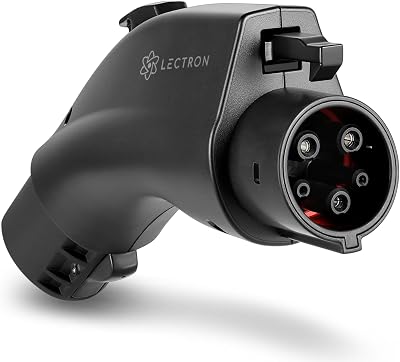
Lectron Vortex Plus NACS-to-CCS Adapter
The Gold Standard — UL 2252 Certified with Safety Interlock
* Amazon affiliate link — EV Charger Scout may earn a small commission at no extra cost to you.
Direction 2: Tesla and NACS Vehicles at CCS Stations (CCS-to-NACS Adapter)
The Supercharger network gets most of the press, but Electrify America, EVgo, ChargePoint, Blink, and dozens of regional CCS DC fast networks collectively represent tens of thousands of additional charging stalls. Many of these stations are strategically located at highway rest stops, grocery stores, hotels, and retail centers where Superchargers don't exist. For Tesla drivers and any other NACS vehicle owner, these stations are accessible — if the station has a CCS1 cable available and no NACS cable. That's where a CCS-to-NACS adapter earns its place in your bag.
The market shift is real: as of early 2026, most newer EVgo and Electrify America stations have added NACS cables, so the adapter need is decreasing at newer sites. But thousands of older stations — particularly highway corridor units installed 2020 through 2023 — still only carry CCS1 tethered cables. Showing up without an adapter at one of these means waiting for a newer stall or driving to the next stop.
Who Needs This
- →Tesla Model 3, Y, S, X — 2021 or newer (must have CCS adapter support enabled — see below for how to verify this on your touchscreen)
- →Ford Mustang Mach-E and F-150 Lightning (2024+ with native NACS port)
- →Rivian R1T / R1S (2024+ with factory NACS port)
- →Any GM NACS vehicle (2024 Silverado EV, Blazer EV, Equinox EV with NACS equipped)
- →Pre-2021 Tesla owners: CCS1 hardware retrofits exist but check Tesla support for your specific model
On your Tesla touchscreen: tap the car icon (Controls) in the bottom-left corner → tap Software → tap Additional Vehicle Information (may also appear as "Additional Information"). Look for the line that says "CCS adapter support" (sometimes listed as "CCS" or "CCS and 3rd-party charging"). If it shows Enabled, your Tesla supports CCS charging and you can use this adapter. If it shows Not Enabled or Not Installed, your car does not currently support it — some older models can get a hardware retrofit through Tesla Service; others cannot.
Regional Notes for CCS-to-NACS
In Europe, Tesla vehicles ship with CCS2 ports natively — the vehicle will charge at any CCS2 DC fast station without an adapter. This adapter direction (CCS1-to-NACS) is specific to North America and a few other markets where CCS1 is the deployed standard.
In China, charging standards are GB/T (the national standard for DC fast charging). Neither NACS nor CCS1 apply. Vehicles sold for the Chinese market are equipped accordingly. An adapter from this guide will not function at GB/T stations.
In Japan, CHAdeMO was the dominant DC fast-charging standard for years. It is still present at many stations, but the market is transitioning. CCS1 stations in Japan remain limited. If you're traveling to Japan with a NACS vehicle, check the current network situation carefully — the landscape is evolving quickly.
In Australia, CCS2 is the prevailing standard for DC fast charging outside of Tesla infrastructure. An adapter from this guide won't convert to CCS2 — it covers CCS1 only. Australians traveling with NACS vehicles will find an increasing number of native NACS stalls at Tesla Superchargers but should check current availability for non-Supercharger networks in their area.
Top Pick: Lectron CCS-to-NACS Adapter
Lectron's CCS-to-NACS adapter is the top-rated option for Tesla and other NACS vehicle owners wanting access to CCS1 DC fast chargers. It carries UL 2252 certification from SGS, is rated to 500A and 1,000V DC, and includes IP67 weather sealing for all-conditions reliability. Unlike several competing options in this direction that use cost-cut contacts, the Lectron unit is independently verified for thermal performance at high sustained currents — meaning a 150 kW session is not going to cause it problems. The 2-year limited warranty and explicit vehicle compatibility documentation round out a package that's easy to recommend without qualification.
| Spec | Lectron CCS-to-NACS Adapter |
|---|---|
| Certified by | UL 2252 (SGS / NRTL) |
| Max current / voltage | 500A / 1,000V DC |
| Weather rating | IP67 |
| Operating temperature | -22°F to 122°F (-30°C to 50°C) |
| Warranty | 2-year limited |
| Compatible networks | Electrify America, EVgo, ChargePoint DC Fast, Blink DC Fast |
| Vehicle direction | NACS car → CCS1 charger cable |
| Tesla requirement | CCS enabled in vehicle settings (2021+ Model 3/Y/S/X) |

Lectron CCS-to-NACS Adapter for Tesla
UL 2252 Certified — Charge Your Tesla at Any CCS DC Fast Charger
* Amazon affiliate link — EV Charger Scout may earn a small commission at no extra cost to you.
What to Look for When Buying Either Adapter
The adapter market has grown quickly, and not every product on a marketplace listing deserves your trust at this power level. Here's what actually separates a reliable adapter from one that's a liability:
- →UL 2252 certification — This is the specific standard for EV charging cable adapters and connectors. Look for independent certification from an NRTL (Nationally Recognized Testing Laboratory) such as SGS, UL, or Intertek. "Self-certified" by the manufacturer means nothing at 500A.
- →Rated amps and volts — Minimum 500A and 1,000V DC for a DC fast charging adapter. Lower ratings will thermally throttle the session or fail under sustained high-power use.
- →IP rating — IP67 or better means the adapter can handle rain, wet pavement, and dusty conditions without damage. You will eventually drop this on a wet parking lot.
- →Mechanical locking — Both ends of a quality adapter should engage with a positive latch mechanism, not just friction fit. Loose connections cause arcing and connector damage over time.
- →Explicit vehicle compatibility list — Reputable manufacturers publish this. If a manufacturer's website has no compatibility list, that's a red flag. Verify your make, model, and model year is listed before buying.
- →Warranty length — The market standard is 1 year. Two years is above average and worth paying a small premium for given the safety-critical nature of the product.
Avoid no-name or unbranded adapters on marketplace listings that do not specify an independent certification body. At 500 amps and 1,000 volts, a poorly manufactured adapter can overheat, damage your vehicle's charging port, or — in rare cases — cause a more serious electrical fault. The price difference between a certified and an uncertified adapter is rarely more than $30–$50. It is not worth saving.
Practical Tips for Using Adapters on the Road
- →Carry the adapter in a dedicated pouch or the original case if one is included — contact pin damage from loose storage is common and expensive.
- →Inspect the contacts before each use. A bent or corroded pin means the adapter goes back to the manufacturer, not back into service.
- →After a high-power session (150 kW or more), wait a minute before removing the adapter. The contacts retain heat and allowing them to cool reduces wear.
- →Don't leave the adapter plugged in unattended in extreme cold or heat — thermal stress on the housing over long periods can affect the locking mechanism.
- →Register your adapter purchase with the manufacturer if they offer warranty registration. It simplifies any future replacement claims.
If you're on a long road trip and unsure whether a specific station will have the cable type your adapter handles, use EV Charger Scout's connector filter to check the station's reported port types before you arrive. It pulls live data from NREL and OpenChargeMap, so you'll know what to expect at any stop on your route.
The Bottom Line
An EV charging adapter is not a workaround or a compromise — it's a practical tool that removes artificial network boundaries. Drivers who carry the right adapter for their vehicle type have access to a substantially larger fast-charging footprint than those who don't, with no downside beyond the upfront cost and the minor inconvenience of carrying a small piece of hardware.
If you drive a CCS1 vehicle in North America, a UL-certified NACS-to-CCS adapter opens every Tesla Supercharger in your region. If you drive a Tesla or any NACS-native vehicle, a UL-certified CCS-to-NACS adapter ensures you never get stranded at an older station that hasn't added a NACS cable yet. Both situations are straightforward, both adapters are widely available, and both represent real-world charging access that costs under $200 to unlock.
Buy once, tuck it in your charging bag, and carry it. The network you think you have is smaller than the one you can actually use.
Frequently Asked Questions
Why do NACS-to-CCS and CCS-to-NACS adapters both exist?
North America is mid-transition between two DC fast charging standards: NACS (the Tesla-originated SAE J3400 connector now adopted by most automakers) and CCS1 (used by most non-Tesla vehicles sold before 2025). Because networks are adding new connectors at different rates, adapters bridge the gap in both directions so you can use whichever cable a station actually has.
Can a non-Tesla CCS vehicle charge at a Tesla Supercharger?
In most cases, yes. As of early 2026, the Supercharger network spans more than 60,000 stalls and the vast majority is open to non-Tesla vehicles. In North America, all V3 and V4 stations accept CCS1 cars with a NACS-to-CCS adapter (or built-in Magic Dock units), adding 20,000+ fast-charging stalls in the US alone. You authorize the session through the Tesla app with a non-Tesla account.
What certification should an EV charging adapter have?
Look for UL 2252, the specific standard for EV charging cable adapters, independently certified by an NRTL such as SGS, UL, or Intertek. A DC fast charging adapter should be rated to at least 500A and 1,000V DC with an IP67 weather rating and positive mechanical latching on both ends. “Self-certified” claims mean nothing at 500 amps.
Do these adapters work in Europe, China, Japan, or Australia?
No. In Europe, Tesla vehicles use CCS2 natively and plug into Superchargers without any adapter. China uses the GB/T standard, Japan still has significant CHAdeMO infrastructure, and Australia uses CCS2 outside Tesla infrastructure. The NACS and CCS1 adapters in this guide are specific to North America and a few other markets where CCS1 is deployed.
How do I confirm my Tesla supports CCS charging?
On your Tesla touchscreen, tap the car icon (Controls), then Software, then Additional Vehicle Information, and look for the “CCS adapter support” line. If it shows Enabled, you can use a CCS-to-NACS adapter. If it shows Not Enabled or Not Installed, your car doesn't currently support it — some older models can get a hardware retrofit through Tesla Service, others cannot.
More guides on Gear & Equipment
Explore the full Gear & Equipment topic hub — related guides that build on this one.
CCS2 vs GB/T in Asia: The Complete Adapter Guide for 2026
11 min read
Toyota's Free NACS Adapters for 2026 Models: Where to Plug In Without Extra Cost
10 min read
Best NACS to CCS Adapters in 2026: Lectron Vortex, A2Z Typhoon, and More
10 min read
Top Portable EV Chargers and Adapters for Road Trips
9 min read