 EV Charger Scout
Two identical EVs pull into the same fast-charging site on a January morning. One driver plugs in and watches the screen climb to 200 kW within a minute. The other watches it sit at 40 kW for twenty minutes before it slowly picks up. The cars, the charger and the weather are the same. The difference is that one battery arrived warm and the other arrived cold — and warming a battery on purpose before you plug in is called preconditioning. This guide is about that one thing: how to trigger it on each major brand, what it actually does, how much time it saves, and what to check when a session is slow anyway. It is not about winter range or cabin heating; for those, see our winter battery care guide.
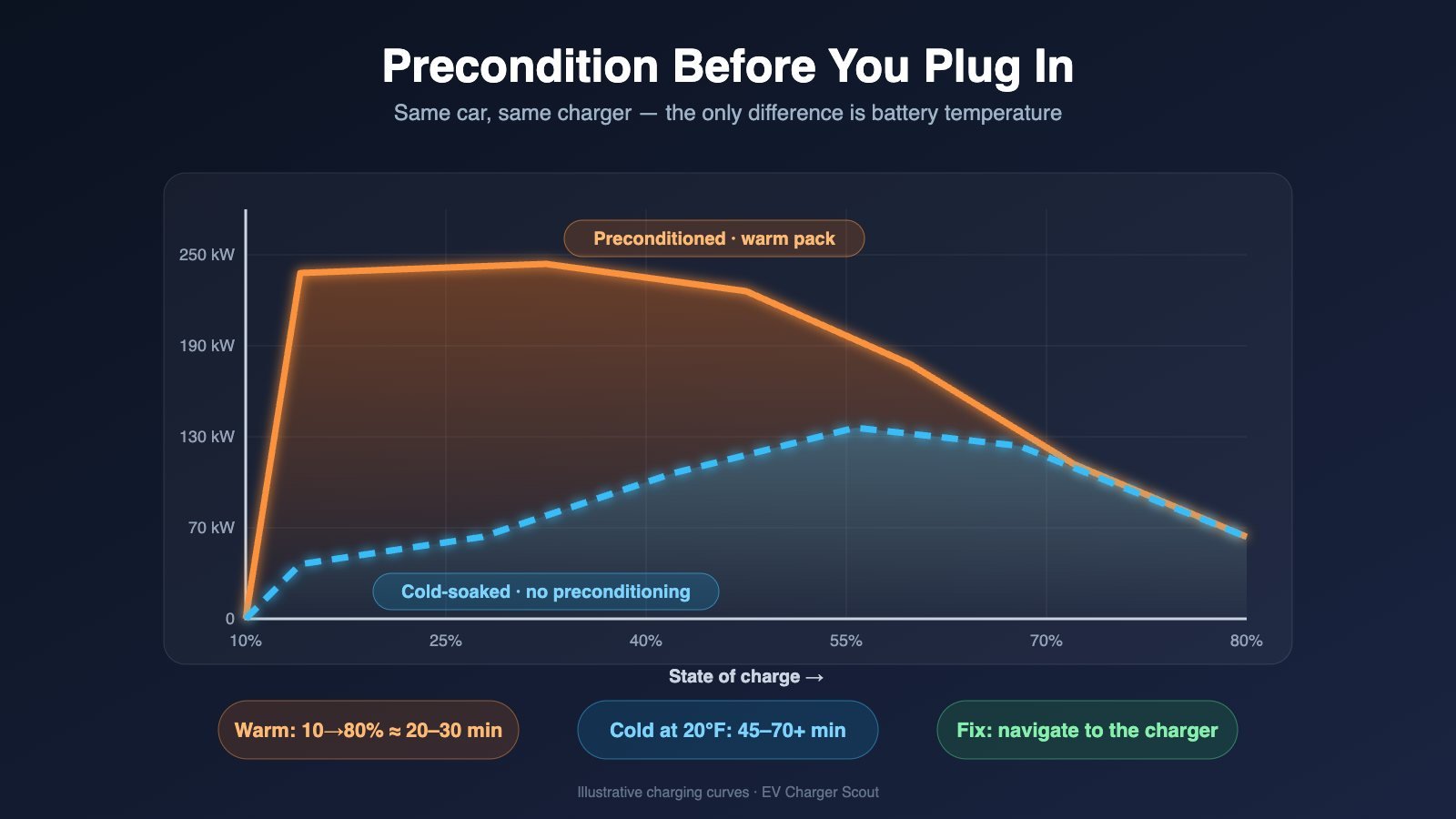
Illustrative charging curves for a typical 400V EV. The warm pack hits its peak almost immediately; the cold pack spends the first half of the session heating itself. Illustration: EV Charger Scout. Tap the image to enlarge.
The physics, in two paragraphs
A lithium-ion cell charges by moving lithium ions out of the cathode, through the electrolyte, and into the graphite anode. Every step of that journey slows down as the cell gets colder: the electrolyte thickens, the ions move more sluggishly, and the anode accepts them less readily. Push the same high current into a cold cell and lithium starts to plate onto the anode surface as metal instead of slotting into the graphite — a permanent loss of capacity and a safety risk. The battery management system knows this, so below roughly 10–15°C it caps charging current hard, and near or below freezing it may cap it at a small fraction of the pack's rating. Most EVs accept charge fastest with the cells somewhere between about 20°C and 45°C, and preconditioning is simply the car heating (or, on a hot day, cooling) the pack into that window ahead of time.
The second piece is the charging curve. A DC fast charger doesn't deliver its peak power for the whole session; the car requests less as the cells fill, tapering steadily above roughly 50–60% state of charge and sharply above 80%. The peak-power window is therefore narrow — typically the first 10–50% — and it is exactly the part of the session a cold battery wastes. A cold-soaked pack spends that window warming itself with the modest current it can accept, then finally reaches temperature just as the taper begins. That is why an unconditioned winter session isn't just "a bit slower": it can be twice as long, because the fastest part of the curve never happens.
What "navigate to the charger" actually triggers
Every brand's advice comes down to the same instruction — set a DC fast charger as your destination in the car's own navigation — so it helps to know what that does under the skin. When the route contains a fast-charging stop, the car's energy manager gets three things it can't get from you just driving there: the destination is a DC charger (so a warm pack will matter), an estimated arrival time, and a predicted arrival state of charge. With those, it schedules a heating job that brings the pack to target temperature at roughly the moment you pull in — starting anywhere from 10 to 45 minutes out depending on how cold the pack is — using the battery heater, the heat pump, or in Tesla's case waste heat generated by deliberately running the drive motors inefficiently.
That is also why the feature has conditions. Ford, for example, won't precondition if it predicts you'll arrive below 5% or with fewer than 10 miles of range, because the heating draws from the pack and it won't risk stranding you. Several brands also give cabin comfort priority over battery heating, so on a brutally cold day turning the cabin heat down for the last stretch can free up capacity for the battery. And it is why navigating on your phone, or simply driving to a charger you know, does nothing: the car never learns a fast charge is coming. Phone-based routing counts only where the car is integrated with it — Ford supports Google Maps EV Routing on Android Auto and, on the 2026 Mustang Mach-E, Apple Maps EV Routing on CarPlay, but only when the routing app itself inserts the charging stop.
Look for the confirmation. Most cars show a small indicator once preconditioning is running — Tesla displays "Preconditioning battery for fast charging" on the navigation panel, Chevrolet shows a battery icon next to the arrival mileage, and Hyundai and Kia show a battery-conditioning symbol in the cluster. No indicator usually means the car doesn't think it's heading to a fast charger.
How much time you lose at 20°F if you skip it
Independent cold-weather charging tests and owner-logged sessions tell a consistent story. At around 20°F (−7°C), a battery that has cold-soaked overnight typically begins a session at a small fraction of its rated peak — often somewhere in the 30–70 kW range on a car rated for 150–250 kW — and climbs only as the charging current itself warms the cells. The result is that a 10–80% stop which takes about 20–30 minutes on a preconditioned pack commonly runs 45–70 minutes, and on cars with weak battery heating or very cold-sensitive chemistry can run longer still. The table below is deliberately generic — exact figures vary by vehicle, charger and how deeply the pack has cold-soaked — but the ratio is what matters.
| Scenario at ~20°F / −7°C | Typical starting rate | Typical 10–80% time | Time lost |
|---|---|---|---|
| Preconditioned via navigation (pack warm on arrival) | Near rated peak | 20–30 min | — |
| Driven 30+ min on the highway, no preconditioning (pack partly warmed by driving) | Roughly half of peak, rising | 30–45 min | +10–15 min |
| Cold-soaked overnight, short drive, no preconditioning | A fraction of peak (often 30–70 kW) | 45–70+ min | +25–40 min |
| Cold-soaked, LFP battery, no preconditioning | Lowest of all — LFP is the most cold-sensitive chemistry | 60+ min | +40 min or more |
Two things follow from that table. First, preconditioning costs energy — typically a few percent of the pack, which the car recovers many times over in the time saved — so it is never worth "saving range" by skipping it. Second, the penalty is heaviest for LFP-equipped cars (Tesla rear-wheel-drive models, every BYD, standard-range Mach-E and Rivian), which lose more charging capability in the cold than nickel-based packs; if you own one, preconditioning in winter is close to mandatory. Our LFP vs NMC charging guide explains why.
DC Fast Charging Upgrade · EV Shop

Lectron CCS-to-NACS Adapter for Tesla
UL 2252 Certified — Charge Your Tesla at Any CCS DC Fast Charger
* Amazon affiliate link — EV Charger Scout may earn a small commission at no extra cost to you.
Brand-by-brand: how to precondition
The trigger is always the car's navigation; the details — menu names, whether there's a manual switch, and which phone-routing apps count — differ. Steps below reflect current (2025–2026) software; older model years may lack the manual options.
Tesla (Model 3, Y, S, X, Cybertruck)
- 1On the touchscreen, tap the navigation search bar and choose a Supercharger (tap the lightning-bolt filter or type the location).
- 2Start navigation. "Preconditioning battery for fast charging" appears on the map panel when heating begins — typically 10–30 minutes before arrival, earlier in deep cold.
- 3Leave the route active until you plug in. Cancelling navigation stops preconditioning.
- 4For non-Tesla fast chargers: on software 2025.2 or later, navigating to a third-party DC fast charger that appears in the car's navigation also preconditions. Navigating in the Tesla phone app or a third-party app does not.
There is no manual "precondition now" button on a Tesla; navigation is the only trigger. If you're already at a Supercharger with a cold pack, the car will warm itself during the session and the rate will climb — just slowly.

Lectron Vortex Plus NACS-to-CCS Adapter
The Gold Standard — UL 2252 Certified with Safety Interlock
* Amazon affiliate link — EV Charger Scout may earn a small commission at no extra cost to you.
Hyundai / Kia / Genesis (Ioniq 5, Ioniq 6, Ioniq 9, EV6, EV9, GV60 and other E-GMP cars)
- 1Enable the feature first: Setup → EV → Battery Conditioning Mode (the exact path varies slightly by model year; on older cars it is called Winter Mode). It stays on once set.
- 2Set a DC fast charger as the destination in the built-in navigation. Conditioning starts automatically when the car judges the pack needs it, and a battery-conditioning symbol appears in the cluster.
- 3Keep the route active until you arrive. Android Auto and CarPlay routing do not trigger it.
Hyundai's own description is that Battery Conditioning "maintains DC charging performance" by managing pack temperature on the way to a charger. It matters a lot on these cars: the E-GMP platform's 800V architecture can exceed 230 kW when warm, so an unconditioned winter session gives up more absolute speed than on most EVs.
Ford (Mustang Mach-E, F-150 Lightning)
- 1Use the built-in Connected Navigation: pick a DC fast charger from the nearby-chargers list or plan a route that includes a fast-charging stop. Ford calls the feature En-Route Preconditioning and it switches on automatically.
- 2Alternatively, route with Google Maps EV Routing on Android Auto — Ford integrates it — and on the 2026 Mustang Mach-E, with Apple Maps EV Routing on CarPlay. In the Apple Maps case it only works when the app itself adds the charging stop; manually navigating to a charger in CarPlay does not precondition.
- 3Know the cut-offs: Ford won't precondition if it predicts you'll arrive under 5% or with under 10 miles of range, and cabin comfort takes priority — easing the cabin heat on the approach frees capacity for the battery.
GM Ultium (Chevrolet Equinox EV, Blazer EV, Silverado EV, Cadillac Lyriq, GMC Hummer EV, Sierra EV)
- 1Use the built-in Google Maps and plan a route that includes a fast-charging stop, or select a DC fast charger as the destination. If a fast-charging stop is planned in the route, the vehicle starts battery preconditioning automatically.
- 2Watch for the battery icon next to the arrival mileage on the navigation screen — that is the only confirmation that preconditioning is active.
- 3Let Google Maps add the stop when your charge is low; it prompts you to add one, and accepting it triggers the same preconditioning.
The 2017–2023 Chevrolet Bolt EV and EUV are not Ultium cars and do not have this function — see the section on cars that can't precondition below.
Rivian (R1T, R1S)
- 1Navigate to a DC fast charger in the built-in navigation. Rivian heats the pack en route only for chargers set as a destination — driving to one without a route does nothing.
- 2Or use the manual option: Rivian added manual battery preconditioning for DC fast charging by over-the-air update, alongside scheduled battery preconditioning in the Climate Schedule panel (software 2023.50 and later). Manual preconditioning is the fallback when a charger isn't in the car's map database.
- 3If you're leaving from home, schedule preconditioning to run while plugged in so the heating comes from the wall, not the pack.
BMW (i4, i5, i7, iX, iX1, iX2, iX3)
- 1Use BMW Maps with active route guidance to a DC charging station. BMW's stated behavior: battery preconditioning activates automatically if required, unless you've disabled it in the battery preconditioning menu.
- 2On newer software some models also offer a manual preconditioning tile in the charging menu; availability varies by series and software version, so check your charging settings. If there's no tile, BMW Maps routing is the trigger.
- 3Route guidance through CarPlay or Android Auto does not precondition — it must be BMW Maps.
Level 2 Essentials · EV Shop

Lectron J1772-to-NACS Adapter
UL 2252 Certified — Charge Your Tesla at Any J1772 Level 2 Station
* Amazon affiliate link — EV Charger Scout may earn a small commission at no extra cost to you.
Mercedes-Benz (EQS, EQE, EQB, EQA)
- 1Navigate to the charger with the built-in MBUX navigation (Navigation with Electric Intelligence). Mercedes' owner's manual states that when driving to a charging station guided by the navigation system, the high-voltage battery's temperature is controlled in advance for an optimal charging experience.
- 2Let Electric Intelligence plan the stops on a longer route — it inserts charging stations automatically and preconditions for each.
- 3There is generally no separate manual preconditioning switch in MBUX; navigation is the trigger. Check the charging settings on your software version, but assume you need an active route.
| Brand | Trigger | Manual option? | Phone routing counts? |
|---|---|---|---|
| Tesla | Navigate to a Supercharger (or a listed third-party fast charger on 2025.2+) | No | No |
| Hyundai / Kia / Genesis | Battery Conditioning Mode on + navigate to DC charger | No (mode toggle only) | No |
| Ford | Navigate to DC charger or route with a charging stop | No | Google Maps EV Routing (Android Auto); Apple Maps EV Routing on 2026 Mach-E |
| GM Ultium | Route with a fast-charging stop in built-in Google Maps | No | No |
| Rivian | Navigate to DC charger | Yes (OTA-added) + scheduled | No |
| BMW | BMW Maps route guidance to DC charger | Some models / software | No |
| Mercedes-Benz | MBUX navigation to charger / Electric Intelligence route | Generally no | No |
Slow-session diagnostic checklist
You preconditioned — or think you did — and the session is still slow. Work through these in order; the first three explain the large majority of slow sessions.
| Symptom | Likely cause | What to do |
|---|---|---|
| Starts low (20–60 kW) and climbs slowly over 15+ minutes | Battery still cold — preconditioning didn't run, ran too briefly, or was cancelled | Confirm the indicator appeared. Next time keep the route active, start navigation earlier, and reduce cabin heat on approach |
| Peak was fine but power fell off a cliff around 50–80% | Normal taper — the car, not the charger, is throttling | Unplug at ~80% on road trips; the last 20% takes as long as the previous 50% |
| Rate is exactly half of what you expected | Power sharing — the cabinet splits output between two stalls when both are occupied | Pick a stall whose pair is empty. On older Tesla V2 sites avoid the matching-numbered neighbor (1A/1B); V3 and V4 stalls don't share |
| Rate is capped at 50, 62 or 150 kW no matter what | Charger hardware limit — many stalls are lower-power than the site's headline | Check the stall label or app before plugging in; EV Charger Scout shows per-port power where the network reports it |
| Slow after the second or third fast charge of the day | Battery is now too hot; the BMS is throttling to protect it | Drive 20–30 minutes before the next stop, or accept a slower session. Hot-weather cars precondition by cooling — navigation helps here too |
| Car reports a low state of charge but charges slowly from the start | Cold-soaked LFP pack, or the gauge is out of calibration | Precondition next time; LFP owners should do their weekly 100% charge to recalibrate |
| Slow only at one network | Communication or power-delivery issue with that station, or a 400V/800V mismatch on older units | Try another stall, then another site; report the stall in the network app |
| Session keeps stopping and restarting | Handshake fault — often a dirty or damaged connector, or a car-side software issue | Inspect the plug, reseat firmly, restart from the app; if it persists, try a different network |
A session that starts slow and never rises above 30–40 kW on a warm day is not a preconditioning problem. If it happens at more than one site, have the car's charging system checked — a fault in the DC contactor, coolant loop or charge-port temperature sensor will throttle every fast charge.
Cars that cannot actively precondition
A meaningful number of EVs have no en-route preconditioning at all — either because the platform predates the feature or because the battery has no heater to speak of. If you own one, the goal is to arrive with a pack that has been warmed by driving rather than by design.
| Vehicle | Why | Best workaround |
|---|---|---|
| Chevrolet Bolt EV / EUV (2017–2023) | No charger-targeted preconditioning; the pack heater runs only for cold protection | Remote-start from the app while plugged in before leaving (the car warms the pack when it's cold), then fast-charge right after a highway drive |
| Nissan Leaf (all years) | Passively air-cooled battery with no active thermal management for charging | Charge immediately after driving; avoid back-to-back fast charges in summer, which trigger heavy throttling |
| Mazda MX-30, Fiat 500e, Mini Cooper SE (2020–2024) | No en-route preconditioning function | Arrive with a low state of charge after a longer drive; keep the car garaged overnight in winter |
| Early Hyundai Kona Electric / Kia Niro EV | Winter Mode warms the pack for driving in cold weather but isn't charger-targeted | Turn Winter Mode on; drive 20–30 minutes before the stop |
| Earlier-software VW ID.4 / ID.3, early Toyota bZ4X / Subaru Solterra | Preconditioning arrived via later software; cars without the update lack it | Install the latest software; if still absent, use the driving workarounds |
Getting the most from a car that can't precondition
- →Charge at the end of a drive, not the start. Thirty minutes of highway driving warms the pack more than anything else you can do without a heater.
- →Arrive lower. Starting at 10–20% instead of 40% keeps you in the pack's fastest region for longer once it does warm up.
- →Garage it. A pack that starts the day at 10°C instead of −10°C reaches usable charging temperature far sooner.
- →Use the app's remote start or departure schedule while plugged in. On many of these cars it warms the battery as a by-product of readying the car, and it uses wall power to do it.
- →Plan one longer stop instead of two short ones. Each cold start repeats the warm-up penalty; one session that gets the pack warm and keeps it there is faster overall.

ChargePoint Home Flex (NEMA 14-50 Plug)
Best J1772 — Plug-in up to 40A (50A hardwired), Energy Star, Any Non-Tesla EV
* Amazon affiliate link — EV Charger Scout may earn a small commission at no extra cost to you.
Set the fast charger as a destination in the car's own navigation — not your phone — early enough that the car has 20–30 minutes to heat the pack, and confirm the preconditioning indicator appears. In freezing weather that single habit is the difference between a 25-minute stop and an hour.
Find the right stall before you get there: the EV Charger Scout map shows fast-charger locations with per-port power and live availability where networks report it, so you can navigate to a stall that will actually deliver what your warm battery can take.
Frequently Asked Questions
What does preconditioning an EV battery actually do?
It uses the car's own heater (or, in hot weather, its chiller) to bring the battery cells to the temperature at which they accept charge fastest — typically somewhere in the 20–45°C range depending on the vehicle — before you arrive at a DC fast charger. A pack that arrives already warm starts near its peak charging rate instead of spending the first 15–30 minutes of the session warming itself up.
Why is my EV charging so slowly at a fast charger?
The most common cause by far is a cold battery, which the car protects by limiting charging current. Other frequent causes: the battery is already above 50–60% (every EV tapers sharply as it fills), the stall is sharing power with the car next to you, the charger is a lower-power unit than its label suggests, or the battery is hot from back-to-back fast-charging sessions. The diagnostic checklist in this guide walks through each one.
Does navigating to a Supercharger really precondition a Tesla?
Yes. Setting a Supercharger as the destination in the car's built-in navigation triggers preconditioning automatically, and the car shows a 'Preconditioning battery for fast charging' message while it runs. Since software version 2025.2, Teslas also precondition when navigating to third-party fast chargers listed in the car's navigation. Navigating in a phone app does nothing — the car has to know where it's going.
How much time does skipping preconditioning cost in cold weather?
At around 20°F (−7°C) a cold-soaked battery typically starts a session at a small fraction of its rated peak and a 10–80% charge that would take 20–30 minutes on a warm pack commonly stretches to 45–70 minutes or more. The exact penalty depends on the vehicle, but roughly doubling the stop is a realistic expectation on any EV without active preconditioning.
Which EVs can't precondition their battery for fast charging?
Cars without an en-route preconditioning function include the Chevrolet Bolt EV and Bolt EUV (2017–2023), every Nissan Leaf, the Mazda MX-30, the Fiat 500e, the Mini Cooper SE, and early-software versions of several other EVs. Owners of these cars can still shorten winter fast-charging stops by charging right after a spirited drive, keeping the car garaged, and arriving with a lower state of charge.
More guides on Charging 101
Explore the full Charging 101 topic hub — related guides that build on this one.
LFP vs NMC Batteries in 2026: How You Should Actually Charge Each Type
12 min read
How Long Does It Take to Charge an EV in 2026? Real Times by Charger Type and Popular Models
12 min read
You Just Bought Your First EV – Now What? The Complete New Owner Guide & Checklist
13 min read
EV Charging Station Types Explained: Level 1, Level 2, and DC Fast Charging
8 min read
EV Battery Life in 2026: How Long It Really Lasts and 7 Proven Ways to Slow Degradation
14 min read
Tesla Charging in North America: The Owner's Guide to NACS, Adapters, and What's New in 2026
13 min read
2026 EV Connector Guide: Which Cars Use NACS, CCS, J1772, and More
10 min read
NACS vs. CCS Adapters: A Global Guide for EV Drivers
10 min read
Free EV tools
Put this guide to work — every tool is free and needs no account.
- EV Range LookupOfficial EPA, WLTP & CLTC range for 650+ models
- Real-World Range EstimatorRange adjusted for today's weather and your speed
- Home Charging Cost & PaybackMonthly bill and charger payback time
- EV vs Gas SavingsFuel savings over 1, 5 and 10 years
- EV Incentives by StateRebates and perks in all 50 states + DC
- Charging Network PricesCompare Supercharger, EA, EVgo and more
- Compare EV ModelsBattery, range and charging speed side by side
- Battery Health EstimatorProjected capacity at 100k and 200k miles
- VIN Decoder & RecallsNHTSA specs, recalls and investigations
- CO₂ Savings CalculatorEmissions avoided on your country's grid